Casino
  Live Casino
  Sport
Sport  Zoekopdracht
  Profiel

 Dutch
Dutch  English — GB
 LuckyWave App for Android, iOS & Desktop
LuckyWave offers a special mobile app for its Android and iOS punters. Desktop users can enter the site through a web browser or by installing the LuckyWave PWA app. Android and iOS users can download the file using a QR code from the site.
The software offers access to top slots and live titles from famous providers, such as Pragmatic Play, Evolution, Pragmatic Live, Hacksaw and Endorphina.
| Platform | Access Method | Install Required | Store Availability | Full Feature Access |
|---|---|---|---|---|
| Android | App | Yes | Official download page | Supported |
| iOS | App | Yes | Official download page | Supported |
| Windows | Web browser | No | No desktop software | Supported |
| MacOS | Web browser | No | No desktop software | Supported |

Is there a Lucky Wave App for Android and iOS?
Yes. LuckyWave Casino has mobile software for Android and iOS users, together with a PWA version. Punters can access mobile gaming on the platform from a separate application instead of opening the casino through a mobile browser. Desktop access does not require an installation like the LuckyWave mobile app.
| Feature | Native App | Browser |
|---|---|---|
| Access | Installed app | LuckyWave website |
| Installation | Required | Not required |
| Platform | Android and iOS | Mobile and desktop browsers |
| Game access | Casino and sports services | Casino and sports services |
| Updates | Installation | Website updates |
Lucky Wave App: Installation Options by Platform
The LuckyWave app download process varies by platform: Android and iOS users download the file from the website, and desktop users access it through a browser or the PWA version. Android users can also add it to the home screen and access the mobile version using the PWA version.
APK Download and Install on Android
Players can install the LuckyWave Android version through the official website, instead of the Google Play Store route. The platform uses this approach due to restrictions on offshore operators imposed by Google Play’s strict gambling policies. Follow these steps to install it:
- Click on Download. Navigate to the side menu tab. Scroll down and select “Download App”.
- Select Android download. Scan the special QR code to download the LuckyWave APK file.
- Allow Installation. If the download process is blocked, enable installation from an unknown source.
- Install. After downloading, open the APK file and complete the installation.
Download only from the official website. Users can scan the APK file with antivirus software before installation.
LuckyWave iOS App Download and Installation
The mobile version is compatible with devices running iOS 16.4 or later. Users can download the software from the official site. To get started, follow these steps:
- Click on Download App. Navigate to the menu tab in the lower-left corner of the footer. Scroll down and select “Download App”.
- Select LuckyWave iOS. Scan the QR code and click on “Get App for iOS”
- Start Installation. Follow the installation instructions provided by the operator.
- Complete Setup. Open the software and log in to your account.
Inside the LuckyWave App: Key Features
The LuckyWave casino app provides desktop functionality on mobile with no compromises. The table below has the features that make it stand out.
| Feature | Detail |
|---|---|
| Library | Over 12,000 titles: slots, table games, instant win, hold & win, live casino. |
| Live Casino | A dedicated live page with titles from top providers like Evolution, Pragmatic Play, Live Vegas and BetGames. |
| Payment | Visa, Mastercard, Bitcoin, Ethereum, USDT, Dogecoin and Litecoin |
| User Interface | Mobile-compatible platform with search function, category and provider navigation. |
| Responsible Gambling | Assistance to Gamblers Anonymous, GamCare and Gambling Therapy. |
Top Mobile Games and Providers
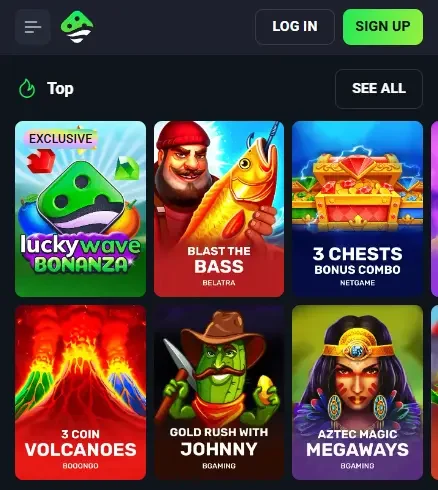
LuckyWave mobile offers top games from reputable providers. These titles are categorised into selections like slots, live section, bonus buy, jackpot and instant win for easy navigation. Below are the top 5 providers and the activities they provide.
- BGaming: Snoop Dogg Dollars, Hot Chilli Bells, Fruit Million.
- Pragmatic Play: Gates of Olympus, Sugar Rush 1000, Big Bass Bonanza.
- NetGame: 3 Chests Bonus Combo, Luck of Panda, Elephant Gold.
- Hacksaw: Spinman, Wanted Dead or A Wild, Epic Ze Zeus.
- Pragmatic Play Live: Roulette, One Blackjack.
Mobile Security and Data Protection
The casino integrates several security measures for protecting players’ accounts, personal data and transactions. These include:
- SSL and PGP encryption. The LuckyWave casino app uses 256-bit encryption and the PGP protocol to protect data transfer between players and the website.
- Account protection. Accounts can be accessed only with a unique user ID and password.
- Two-factor authentication. 2FA can be enabled on Android and iOS devices. This adds an extra layer of protection against unauthorised access.
- Payment security. The platform supports secure payment systems such as cards, bank transfers and cryptocurrencies like Bitcoin, Ethereum, USDT, Dogecoin and Litecoin.
- Identity verification. the operator demands identity and payment documents for account verification, withdrawals and anti-fraud checks.
Troubleshooting and Common App Installation Issues
Most problems can be solved by checking the internet connection, updating the LuckyWave casino app, or clearing cached data.
| Issue | Platform | Cause | Fix |
|---|---|---|---|
| The app will not install | Android / iOS | Installation or device issues | Restart the device, check available storage space and retry. |
| Software or website will not load | Android / iOS / desktop | Internet connection problem | Check the connection, refresh and retry. |
| Games do not start | All | Outdated software or cache | Update the browser/app, clear cache and cookies, then reopen. |
| Game freezes | All | Connection or game session issue | Refresh the title. Contact support if the round remains unfinished. |
| Login fails | All | Incorrect password | Check for uppercase and lowercase differences. Use the “Forgot Password” option if you can’t remember the correct password. |
FAQ
Does LuckyWave Casino have a mobile app?
LuckyWave offers a mobile app for Android and iOS, plus a PWA version and a mobile browser site. The Android app is installed from an APK file on the official website rather than from Google Play. Desktop users can play in a browser or install the PWA. Download the app only from the official website, and check your device's installation prompts carefully before allowing installation from unknown sources.
What games can I play on the LuckyWave Casino app?
The app gives access to the casino's library of 12,000+ titles, including slots, live dealer games, jackpot and bonus buy titles, and instant win games. Games come from providers such as BGaming, Pragmatic Play, Hacksaw and NetGame, and there is search and navigation by category and provider. Live dealer games need real stakes, so they have no demo mode.